
On SmartCustomer, businesses may not offer incentives or pay to remove reviews. Learn more about our Review Guidelines.

ProperSoft Reviews Summary
ProperSoft has a rating of 4.2 stars from 152 reviews, indicating that most customers are generally satisfied with their purchases. Reviewers satisfied with ProperSoft most frequently mention customer service, credit card and bank statements. ProperSoft ranks 2nd among Accounting Software sites.
We monitor reviews for authenticity

This is the first and from researching for days, the only program that I could find that does the conversions of PDF to Excel without any hitch.
I was able to download 12 Bank statements at once and the PDF2CSV program sorted and converted everything nearly instantly. There were no hiccups and the data was clean and organized perfectly.

Calling Intuit Tech support was worthless. They wasted almost 2 hours of my time only to find out that they didn't even have a converter in house. I e-mailed the developer after hours and got an auto reply about business hours. I figured the next day he would take care of. Much to my surprise he replied shortly thereafter with how I could rectify the problem and BLAM! It worked. Spend the cash to pay this family man for his brain power then move on with life knowing you did the right thing today my friend.

Thank you for your review, Peter!
I had a problem converting data from one version of a money management program to another. I was running my business on this software so this needed to be solved. I had tried numerous experts and spent months myself trying to solve this. Propersoft came up with a simple straightforward solution within a week! Very relieved and grateful.
Thank you for your review, Mark.
The software is easy to use, has a clean clear UI, and does exactly what it says it will do. Sergiy answers questions personally and promptly. Highly recommended.
Thank you for your review, David.

I was surprised at their quick and courteous response when I asked for a refund because their application was not suitable for what I needed to do. Quite frankly totally my fault when I purchased the application, and yet ProperSoft had no qualms about prompltly giving me a refund. This is proof of their commitment to serve their customers, and this is a recipe for their success in the marketplace.
Thank you for your review, Ramon.

Fantastic app, and it was a lifesaver. Recently, either my MasterCard bank (Comenity) stopped providing QFX downloads, or Quicken stopped providing OFX imports - I don't know which it was. Anyhow, I was only able to download OFX files from the bank, and unable to import them into Quicken. So, I did a google search and found this product by ProperSoft. I tried the trial version, and it imported 10 transactions flawlessly. This was on my Windows laptop. I immediately purchased the Windows version and used it. Shortly thereafter, my Windows laptop died, and I was forced to switch to using Quicken for Mac on my MacBook. I emailed the company explaining the situation and asking if I could transfer my license from Windows to Mac. They responded right away and provided me a new license key. I installed the license on Mac, and was able to re-import 1005 credit card transactions into Quicken. This app has been such a lifesaver. I am very thankful for it.
Thank you for your review, Michele

I recently had a catastrophic loss of my hard drive and in reinstalling Simple Home Budget I found I could not locate my product key. It was supplied me almost instantaneously. I cannot tell you how much I appreciated this rapid and professional service.
Thank you for your review, Stephen
I have been a user of various ProperSoft converters for a number of years and have been very satisfied with the products and the support.
Thank you for your review, William

I made a mistake when buying the converter. They exchange the purchase for the right one without and BS. Good outfit and the software works flawlessly. Highly recommended
Thank you for your review, Art.
I accidentally ordered the wrong software, and within hours of asking them about it, they exchanged it for the right software. Great customer service!
Thank you, Kobe!
First of all I must say support is fantastic. I submitted a question on the weekend, I'm not even a customer, and the reply came back very quickly.
I did find that QBO files are only supported back to 2016 so my 2011 version needs to use IIF files. OK, fine. I tried the Bank2IIF. I like it, let me be clear, it WORKS.
There are just a couple of items that need to be tweaked.
Mapping: Need to be able to save a set of mappings when converting a bunch of files. I seem to only be able to do ONE. And save them session to session.
Account: It would be nice to have a mapping of vendor to account so that you only have to do it once and then all the files imported would be the same account. That said, it would be GREAT if it used the QB APIs and went INTO your QB File and gave you a drop down list of the accounts and maybe (this is reaching) defaulted to the last account used for that vendor.
Target the product toward repetitive processes, not one offs.
Thank you for your review, Michael.
I purchased ProperSoft's full package more than two years ago & have been very happy with it. It was a one-time purchase, cost very reasonable & it has saved me so much effort for my clients, Highly recommended!
Thank you for your review, Michael
I had a issue trying to convert a PDF to OFX file.
Propersoft support replied quickly to my mail, I tried with the parametrization provided by Propersoft and everything works fine now.
Thank you for your review, Laurent.
I'm still using Microsoft Money and my new credit card didn't support export of statements into the format needed. As it would let me download a pdf statement, I was delighted to find that PDF2QIF would do the necessary conversion to import the statement in the Quicken QIF format. I only need to check the credit/debits are the right way round and unselect a statement total at the bottom. Now I've done it a few times and MS Money has memorised the new payee names, it saves me an enormous amount of time compared to manual entry. It's a relief to be able to continue using MS Money and not have to worry that credit cards and bank accounts might not support export to it. I assume I could also have done the job with some of their other tools and formats (csv, ofx etc), but this works well for me. Many thanks!
Thank you for your review, Mark
The software works perfectly and has saved me from hours and hours of manual entry! I have had questions over the 5 years (at least) that I have been using it and I always get a quick and friendly response.
Thank you for your review, Margot
Not much to say - it did exactly what I needed it to do and I had no problems importing the data into Quicken. Good, simple product!
Thank you for your review, Jacob
My credit card's bank changed and no longer downloads into Quicken. The PrioperSoft program converts CSV files so they can be imported without all that typing. Not as smooth as the direct download, (doesn't use my memorized payee list to assign categories, etc.) but still saves me a lot of work. Took me three tries to get it right the first time, but now it is fine.
Thank you for your review, Patricia

Purchasing this software made it possible for me to convert my Excel files to Quicken format as Paypal has discontinued to allow downloads from their site making it very difficult to download transactions. Works Perfect!
Thank you for your review, JoAnn.
I've used ProperSoft for quite a number of years now and love it. Works beautifully and their support staff always has an answer, if I get stuck. +10 as far as I'm concerned
Thank you for your review, Kimara

Some banks and credit cards do not support downloads to Quicken, but do support. Csv. ProperSoft's CSV2QFX is the perfect solution. The interface is intuitive. So I was easily able to figure out what I needed to do to get the output I needed (i. E. which columns were debits, which columns were credits). I am happy with the product and recommend it.
Thank you for your review, Phyllis.
From the business
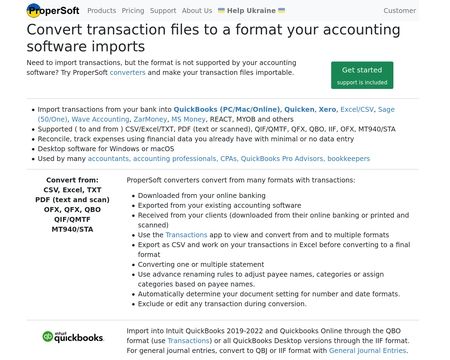
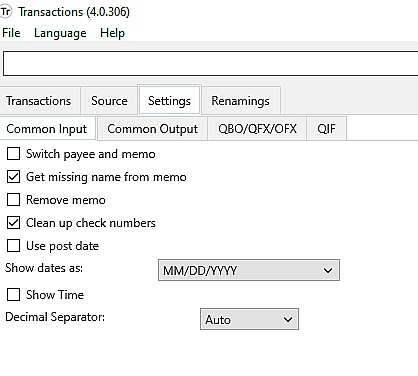
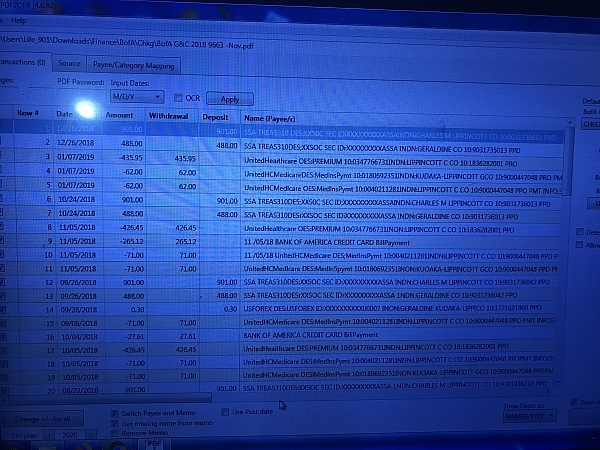
Convert transactions from one format to another and import into accounting software. For example, convert CSV to QBO, or PDF to QBO or Excel to QFX, or OFX to CSV. Make your transactions importable into Quickbooks, Quicken, MS Money, Xero, Sage One and others.

See reviews as you browse!
Get the Chrome Extension.
Add Extension
- SmartCustomer’s sole mission is to increase online transparency for buyers and businesses
- SmartCustomer has helped over 200M buyers make better purchasing decisions online
- Suspicious reviews are flagged by our algorithms, moderators, and community members



- SmartCustomer’s sole mission is to increase online transparency for buyers and businesses
- SmartCustomer has helped over 200M buyers make better purchasing decisions online
- Suspicious reviews are flagged by our algorithms, moderators, and community members
SmartCustomer for Business
Gain trust and grow your business with customer reviews.
Claim your free account
Thank you for your review, David.