
On SmartCustomer, businesses may not offer incentives or pay to remove reviews. Learn more about our Review Guidelines.

Kizoa Reviews Summary
Kizoa has a rating of 3.5 stars from 990 reviews, indicating that most customers are generally satisfied with their purchases. Reviewers satisfied with Kizoa most frequently mention customer service, slide show and good work. Kizoa ranks 1st among Photo Sharing sites.
We monitor reviews for authenticity

When I continued to get the message "Your slideshow failed to upload to Facebook; please try again in a few minutes" for hours on the night before my 22nd wedding anniversary, I emailed Kizoa asking for help. The next morning, I continued to get the same message. I decided to call the Kizoa hotline for help, and within minutes the lady who answered the phone was able to tell me that the connection between Fb and Kizoa had expired, and she also told me exactly how to fix it. Soon after, I received an email response from my query the previous night with the same information. It was great to be able to call a human being and get immediate and accurate help for my problem. Thanks to Kizoa, my husband saw and loved the video. A+ customer service and an A+ anniversary! Thank you!
I feel so lucky I found your site, I knew in my minds eye exactly what I wanted for my sons wedding, and using your site was more than I expected. Reading the site jabber also helped me with queries coming up as I went along, very good communication from kizoa also thank you.
I thought for a very long time about getting the full deal. I was not going to get involved in just another Web design site. But wow was I wrong. I have all the tools to create and manage my very own movies.
Very easy to use. I'm a guy with limited computer knowledge. I watched the YouTube instructional videos and went to work on putting my slideshow together. I was surprised at the ease of doing my project. It took me approximately 2 hours to put the 150 picture slide show together.
One thing about the videos/ movie maker I made apparently not working well when i tried to add it to my slideshow also wheb i tried to downloaded the video with slideshow. It could not allowed me to send by email to friend due bytes size... i am not sure what is the best alernative way do that.
My brother recently passed away and I was asked to do a slideshow of pictures for his Celebration of Life party. Kizoa was incredibly simple to use which was a tremendous help in a stressful situation. The end result was amazing and I could not be happier.
Great little tool. Wish it had a few more controls. But its good at what it does do.

Thanks for your review Nosh! What controls were you thinking of?
Put together a slide show (with music) of my mother who had just passed away (for her funeral services) and everyone loved how it came out. The funeral home will do one for you for a extra cost so I decided to do one myself. The funeral home said they have seen many of these done by people and they thought mine was one of the better ones. Thank you Kizoa for allowing me to do something nice for my mother. She would have loved it!
Lousy! Your instructions for burning a DVD do not work on the Mac computer! I am still waiting for a response from several emails!
Hi Dave, send me a direct email at [email protected] so I can look into your issue. Also, here is a video tutorial on our Youtube channel which shows step-by-step how to burn a DVD with a MAC computer: https://www.youtube.com/watch?v=dbxDJ24zeFs&index=13&list=PL68A0340A03AE5F4B
After shopping for a program that would do a slide presentation for our web site, we found the trial version of KIZOA. What a wonderful program that was easy to use and understand, full version is great and the last two updates with the new frames and borders make me love this software. It makes professional quality with the greatest of ease and the support is tremendous with response in minutes not weeks or days like a lot of the others. THANKS for making such great software to share my family and friend's lives over the internet...
I had to make a video very quickly at work and this program was very easy to use. Video turned out great. Can't wait to do another one!
This site was super helpful and I was able to create a wonderful professionally done slideshow for our wedding!
The program that I had normally been using blew up and I couldn't get it to work and I needed a slideshow fast! I found Kizoa and after some trial error got the hang of it and got slideshow done.
The only ding I have (and it may just be me) I couldn't see how to make the slideshow loop, without having to renter all the pictures and transitions.
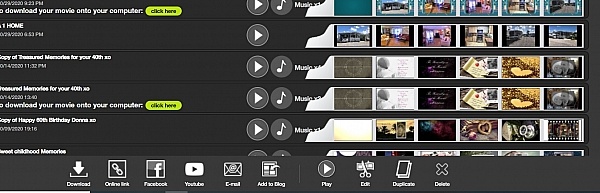
Hi Rick, thanks for your review! If you have a PRO membership you can configure for your slideshow to loop when you embed it onto a website or blog or send it by email. To do this go to the MY SLIDESHOWS tab, select your slideshow, then click on the ADD TO BLOG button at the bottom. You'll see an option within that window that'll pop up that allows you to determine how many loops you want.
This is a great website with lots of options. However, I was unable to create my slideshow because the horizontal scroll bar on the website did not work. The scroll bar refused to move to the right, making it impossible to make my slideshow more than a couple slides. Please fix this.
Also, I read the other reviews about having to pay to download the slideshow. KIZOA STAFF MEMBERS, if you see this, know that I am not happy with this feature. If you are going to advertise your website as a means to make slideshows for FREE and then at the very end tell us that we have to pay, then you might as well not have used the word free in the first place.
What you're doing is not cool.
Hi Amanda, to fix the scroll bar not moving to the right try double-clicking on any slide and click "Validate" on the small window that will appear. You can then try scrolling and it should move. We're in the process of fixing this small glitch very soon! As for what features are including with a free account, I'd like to let you know that the majority of Kizoa is in fact free. You are able to upload your photos and videos and create slideshows, collages, etc. You can even upload your own music and add them to your creations. You'll then be able to share your slideshows and collages for free online either via email, Youtube, Facebook, Twitter, or embed onto your own website or blog. There are a few features only included in our Premium memberships such as downloading to your computer or burning onto DVD, everything else is free!
I had a 2 year membership for $49 which expired but I was pleased to find that it was now advertised as free! I've spent weeks creating a slideshow for daughter's wedding only to find at the end it's $130 to download it or burn a disc. Very unhappy they weren't upfront about this. Also I have never been able to play my previous slideshows that I burned to discs. They won't play in a DVD player. I had to download them and then take my laptop to the venue to show the slideshow. I was ok with that before- but I can't see paying $130 for a download. I now have 2 days and have to start all over with a different program. :(
Hi Gerri, let me know the email address you used for your original Kizoa account so that I can test as to why your slideshows aren't working properly. As a prior member you benefit from a 40% discount to renew your membership to either the Premium DVD membership or the PRO membership. The Premium DVD membership is originally $64.99 and allows you to burn your slideshows to DVD, as well as download them to your computer. With your 40% discount you can obtain by using the promo code: RENEW40 it'll only cost a total of $38.99 and now all of our memberships are lifetime memberships so they will never expire and you'll never need to renew again.
Good product. But disappointing that I spent all this time thinking it's free now I have to pay in order to download to my computer or mp4.
Hi Brenda, sorry for the confusion. Just so you know, you still have the possibility to upload your video to Youtube, email it, post it onto Facebook, or embed it onto your own website.
Customer service replied very quickly and were very helpful and polite. They were able to resolve any issues I had and also provided me with some extra useful information.
SO, I was looking for a program/site to do a special slideshow presentation for my brothers wedding. Everything was great. Easy to use, lots of cool special effects, ect. I was excited! I went to add my own music and after putting 2 weeks of blood, sweat, tears, frustration, and tons of pictures later into this thing, I went to download it to my computer to save it to be able to view it before I burnt a disk to take to my brothers wedding coming up on Aug 7th! Come to find out, it said I had to pay because I added my own music. Ok... easy enough fix. Talk to the DJ, get it situated where I dont need the music. Took the music off the slideshow... Perfect! WRONG! Here I am again with them telling me to pay $65! Are you kidding me? I have less than 2 weeks to have this done after just putting so much time into it already for me to start over somewhere else? There was never any mention of having to pay for a membership when I first signed up?!? Then to put so much time into it and BAM! Just not very happy at this point and very disappointed :(
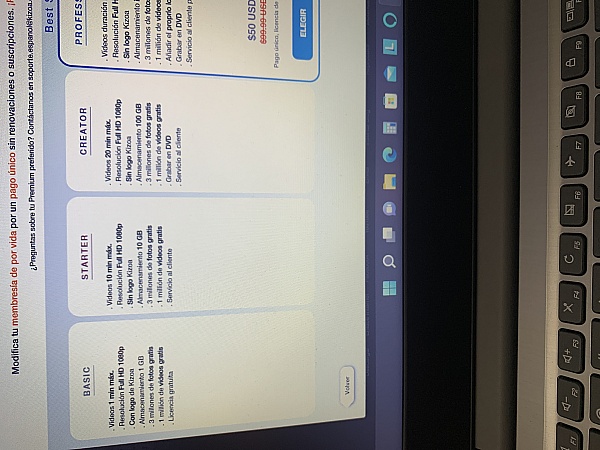
Hi Kellie! Guess what, as of Monday this week the ability to use your own music is now a free feature! This means that you can go ahead and put your own music back on. On the other hand, unless you upgrade to our Premium DVD membership you will only be able to share your slideshow online via email, Facebook, Youtube, Twitter, or you can embed it onto your own website/blog. If you want to download your slideshow to your computer or burn it onto DVD you would need the Premium DVD membership. We do have a chart with these memberships on both our website and inside the platform. In the top left corner of your Kizoa account you'll see a large orange button "Premium" that details which features are included in our memberships. FYI, we are giving out a 25% discount at the moment for any of our Premium memberships with the promo code SUN25. This offer ends on July 29th so I hope this is helpful!
I had MAJOR issues with posting my slideshow to FB. I had worked on this show for my daughter's 50th birthday for the last 5 weeks! Lots of hours. But fun!
When I tried to post to FB, they wouldn't allow due to "copyright issues". I was using songs I had downloaded from the Web. It was devastating I couldn't post, since most people I was sending the show to use FB.
I called Kizoa, and "Veronica" answered. She spent a good amount of time listening to my questions, and assisting me with all the right answers. She showed me the "BLOG" icon, how to cut and paste the link of my slideshow directly into FB. IT WORKED! She get's an A+!
Thank you again Veronica!

A brilliant website - so easy to use and creates great results! I spent ages on my creation but I was really disappointed that I couldn't save it as I wanted to keep it as a keepsake for my twins 1st birthday!
From the business
Create videos, slideshows, collages, and edit photos from the convenience of a single platform with your own account. Combine your photos, videos, music, text, effects, and more for amazing results you can't find anywhere else.


See reviews as you browse!
Get the Chrome Extension.
Add Extension
- SmartCustomer’s sole mission is to increase online transparency for buyers and businesses
- SmartCustomer has helped over 200M buyers make better purchasing decisions online
- Suspicious reviews are flagged by our algorithms, moderators, and community members
Similar businesses you may also like
See more Photo Sharing Businesses




- SmartCustomer’s sole mission is to increase online transparency for buyers and businesses
- SmartCustomer has helped over 200M buyers make better purchasing decisions online
- Suspicious reviews are flagged by our algorithms, moderators, and community members
Hi! If your file is too large then you can simply send a link of your slideshow to your friend so that you do not have to worry about any size limits. Go to the MY SLIDESHOWS tab, select your slideshow then click on the EMAIL button at the bottom of the screen. You'll be able to type in your the emails you want to send it to and you also have an option underneath to allow the recipients to download the slideshow from the email.