Check out our latest communities fighting
AI scams on Reddit and Facebook
On SmartCustomer, businesses may not offer incentives or pay to remove reviews. Learn more about our Review Guidelines.
Offering fast and easy free legal forms crafted by licensed attorneys, our service allows you to save time and money by creating and downloading legally binding documents in minutes. We are honored to be included in Fast Company's 2024 list of the 100 Best Workplaces for Innovators.
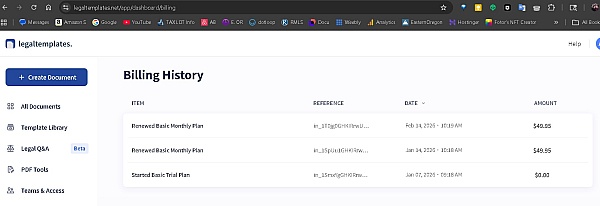
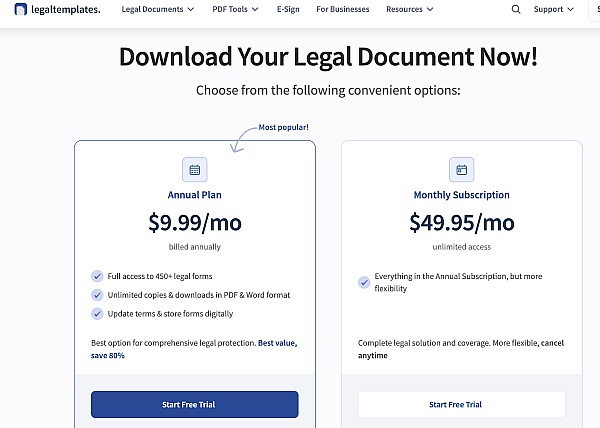
The company has garnered a mixed reputation, with notable strengths in product quality and customer service. Many customers appreciate the ease of use of the website and the availability of legal documents, often highlighting the helpfulness and professionalism of support staff. However, recurring concerns include issues with billing practices, particularly regarding unexpected charges and difficulties in obtaining refunds, which have led to frustration among some users. Overall, while customer service representatives receive praise for their assistance, the company faces challenges in addressing customer complaints effectively, impacting overall satisfaction.
This summary is generated by AI, based on text from customer reviews
We monitor reviews for authenticity

Good I like it. Inshallah we need to go back to the gym and go back to work tonight at work at the gym on Friday night shift at the gym center and then come back to sleep at and start on time and go to the gym again later on Saturday night at work at night and get ready to sleep tonight and then I'm going on the go home and sleep in the night and sleep in
Recently, I discovered LegalTemplates while doing some research on doing business in another state. I was impressed with the amount of information that I was able to find here. My research with SOS office confirms that their information is accurate as well. This is one helluva resource that I will place in my book marks.
Help me out this good site that the landlords can appreciate You really made us feel welcome, as if we'd always lived in the house many renters encounter folks in their building who help them out throughout the year, from the building super to the maintenance person
Can say to much, first time user. I have to see on the way to give a good or bad review about the web.

Great and easy forms. Up to date verbiage, clear options for the every day person I always use this site for every legal document.
It was nice I think I like this app I will send other people to this app to show them how easy it is in helpful

I appreciate the opportunity to try out before subscribing...
Looks good so far!
I look forward to checking out their other forms.

This was so nice and time-saving and I really enjoy it to my best time other than last time ending wasting hours
This template was easy used within muntes and will continue trying for the trial week, used it for a basic contract but well aware its content to use for a more detailed job

Answer: Thank you for reaching out, Sharon. If you need further assistance. We can be reached by email, [email protected] or phone at 1(855) 335-9779, Monday - Friday, 9am -7pm EST.
Answer: Hi Ray, For your convenience, you can access your account 24 hours a day, 7 days a week online. From your Profile icon, simply click on "Account Settings" once you are logged in, then click the cancel button.
Answer: Hi Lillian! 1. Make sure you are logged in. Go to your dashboard to download: https://app.legaltemplates.net/dashboard 2. You should see your document along with a down arrow icon beside it. Click on the arrow, and you will be able to download your document in either WORD or PDF format. Once downloaded, you may then print your document.
Answer: Hi Bobby, to print please locate the three-dot icon positioned on the right side of the document. Clicking on it will trigger a dropdown menu to appear. Within this menu, opt for the "Print" option from the dropdown menu for immediate printing. If you have further questions, please be sure to contact our Customer Support Team during business hours, Monday to Friday, 9 AM to 10 PM EST. You can email us at [email protected], call us at 1-855-335-9779 or reach us via chat.
Answer: Hi Laurie, You can download your documents here: https://app.legaltemplates.net/dashboard Make sure you are logged in, your email should appear on the top right-hand side corner, If instead, you see GUEST; please click on the link to log-in. After logging in, locate the "My Document" section on the left panel, where you will find the list of documents you have created in the center of the page. Click on the three-dotted lines on the right, which will prompt a drop-down list. From there, select "Download" and choose either the WORD or PDF format. Once the file has been downloaded in your preferred format, you can proceed to print the document. We can be reached by email, [email protected] or phone at 1(855) 335-9779, Monday - Friday, 9am -7pm EST.
Answer: You can download your documents here: https://app.legaltemplates.net/dashboard Make sure you are logged in, your email should appear on the top right-hand side corner, If instead, you see GUEST; please click on the link to log-in. After logging in, locate the "My Document" section on the left panel, where you will find the list of documents you have created in the center of the page. Click on the three-dotted lines on the right, which will prompt a drop-down list. From there, select "Download" and choose either the WORD or PDF format. Once the file has been downloaded in your preferred format, you can proceed to print the document. Feel free to contact me if you require further assistance.
Answer: 1. Make sure you are logged in. Go to your dashboard to download: https://app.legaltemplates.net/dashboard 2. You should see your document along with a down arrow icon beside it. Click on the arrow, and you will be able to download your document in either WORD or PDF format. Once downloaded, you may then print your document.
Answer: Hi Orrion! 1. Make sure you are logged in. Go to your dashboard to download: https://app.legaltemplates.net/dashboard 2. You should see your document along with a down arrow icon beside it. Click on the arrow, and you will be able to download your document in either WORD or PDF format. Once downloaded, you may then print your document.
Answer: Hi Herman! 1. Make sure you are logged in. Go to your dashboard to download: https://app.legaltemplates.net/dashboard 2. You should see your document along with a down arrow icon beside it. Click on the arrow, and you will be able to download your document in either WORD or PDF format. Once downloaded, you may then print your document.


Thank you, Kevin! Your positive feedback is much appreciated. I am sorry for the misunderstanding, but you have the option to click out of the review and download/preview your document. Please let me know if you need further assistance.